
TM SIM Registration with PhilSys ID 2026 — Simple Guide
If you’re using a TM SIM card in the Philippines this year, one of the easiest ways to register it is by using your Philippine National ID (PhilSys ID) — and yes, it works! Whether you’re a new subscriber or updating your details, registering your SIM with your National ID is now a must under the SIM Registration Act (Republic Act No. 11934). By law, every active SIM must be linked to a real person’s identity.
This guide breaks down everything you need to know about TM SIM registration with PhilSys ID in 2026 — again, in plain, friendly language.
What Is SIM Registration and Why It Matters
SIM registration ties your mobile number to your identity. It’s required before you can use your TM SIM for calls, texts, or data. If you don’t register, your SIM may stop working or get blocked.
Using your Philippine National ID (PhilSys) is one of the most common and accepted ways to do this.
Why Using PhilSys ID Is an Easy Choice
Your PhilSys ID is a government‑issued ID with your photo, full name, and your unique ID number. It’s strong proof of identity and one of the simplest IDs to use for SIM registration.
Here’s why it’s helpful:
You already have all the required information on the card
The system easily matches your name and birthdate
It’s officially accepted and widely supported
Good tip: If possible, use the physical card or a high‑quality photo of it when uploading your ID during registration. Clear images matter.
What You Need Before Registering Your TM SIM
Before you start, make sure you’re ready with:
It’s important that the name and birthdate you enter on the form match exactly what’s on your ID. Even small differences can cause errors.
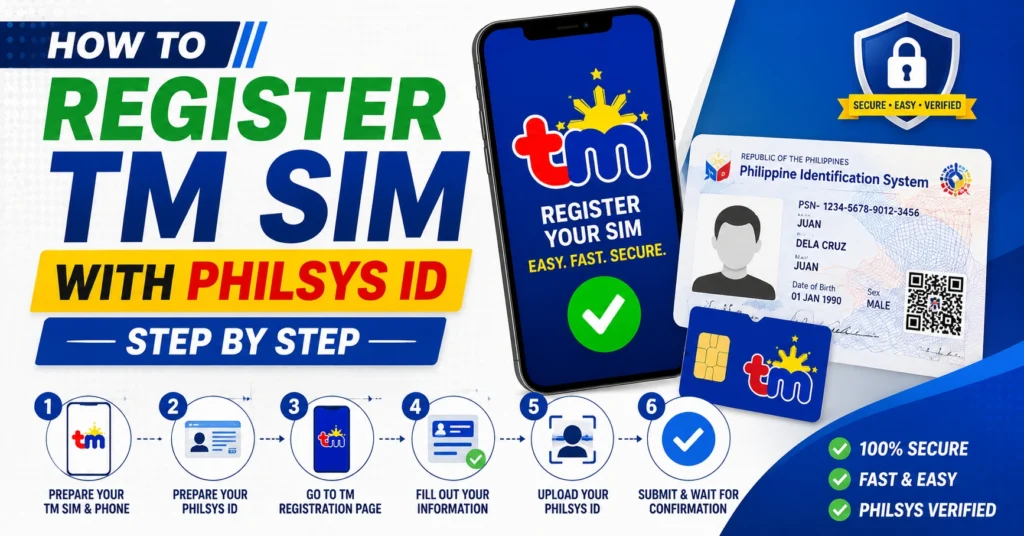
How to Register TM SIM with PhilSys ID — Step by Step
1. Go to the Official Registration Portal
Open the Globe/TM SIM registration page on your phone or laptop. You can also use the GlobeOne app if you already have it installed.
Enter Your TM Mobile Number
Type your number and wait for a one‑time passcode (OTP) sent via SMS. This lets the system verify it’s your SIM.
Fill Out Your Personal Information
Enter your:
Upload Your PhilSys ID
Upload a clear photo of your PhilSys ID. The photo should be readable, with all numbers visible and no glare.
Take a Selfie for Identity Match
You’ll be asked to take a selfie so the system can match it to your ID photo. This helps confirm it’s really you.
Submit and Wait for Confirmation
After submitting, you’ll get a confirmation message when your registration is approved. Keep this for your records.You can also read: TM SIM for Overseas Users 2026: Simple Guide
Tips for a Smooth Registration
Here are some quick tips people often overlook:
Use good lighting when taking ID and selfie photos. Clear and bright shots get accepted faster
Double‑check your spelling before submitting — mismatched names cause errors
Make sure your ID isn’t expired. Expired IDs will be rejected
Don’t edit or crop the ID photo too much. Keep the whole ID visible
What Happens If You Don’t Register
If you skip registration or make a mistake:
So it’s best to complete it early, especially if your SIM is new or recently replaced.
FAQ’s
Final Words
Registering your TM SIM with your PhilSys ID in 2026 is simple if you have your ID ready and follow the steps carefully. It only takes a few minutes, and it keeps your mobile number active and secure.
Remember: clear photos + accurate details = smooth registration. Follow the steps above, and you’ll avoid the most common mistakes people make


